A fifth-generation family office managing hundreds of entities across the United States and Europe needed a scalable accounting platform to replace a legacy investment accounting system and years of manual Excel work.
CrossCountry led the implementation of Sage Intacct, including advanced functionality for global consolidations, dynamic allocations, and the automated integration of a third-party accounts payable solution. This provided the organization with real-time reporting and insights, while streamlining their procure-to-pay business processes to support its next generation of growth.
The challenge: fragmented reporting and manual processes across a growing entity structure
The family office relied on a legacy investment accounting system more suited for trust and investment portfolio tracking, but limited in general accounting, reporting flexibility, and integration capabilities.
With close to 300 entities spanning multiple countries, currencies, and investment types, including real estate, energy assets, funds, and personal holdings, the small accounting team depended heavily on Excel to produce consolidated reports.
The accounts payable process was equally manual: reviewing, approving, and processing payments across more than 100 bank accounts took three to five days per cycle. Entering its fifth generation, the organization needed a flexible, scalable solution built to support growth over the next five, 10, and 20 years.
What CrossCountry delivered
Implemented Sage Intacct’s global consolidations module for multi-entity reporting, including dynamic allocations for partial ownership and pass-through reporting
Automated intercompany eliminations and multi-currency translations
Designed and validated a third-party integration to automate accounts payable
Customized vendor master data records to capture unique support ACH and wire payment information
Configured the cash reconciliation module with rule-based matching for 100-plus bank accounts
Automated cash and budget reporting through the financial reporting and budget modules
Implemented a separate Sage Intacct instance for seven affiliated foundations to tailor operational setup and reporting for non-profit industry standards
Provided ongoing post-production support following go-live
How CrossCountry built a scalable accounting foundation for a fifth-generation family office
CrossCountry followed its standard implementation framework: discovery, process redesign, configuration, data migration, training, and change management. The engagement began with an in-depth discovery phase focused on the family office’s current processes, pain points, and long-term growth plans.
Instead of replicating existing workflows, the team brought a blank-slate mindset to the engagement. It reimagined how a modern technology infrastructure could strengthen current operations while building the flexibility needed to scale as the organization grows.
For example, Sage Intacct’s global consolidations functionality helped streamline their multi-entity reporting capabilities by automating intercompany eliminations and currency translations to easily report across their USD and non-USD entities together each month.
In a second phase, the team implemented a separate Sage Intacct instance configured specifically for the family office’s seven foundations, previously managed on a disconnected system.
“After going through a two-year process of implementing our technology stack and all of the teams we worked with along the way, the CrossCountry team was by far the most impressive group to work with. The partnership, the responsiveness, the professionalism, the ability to hear our pain points coming from our old processes, and turnaround actionable solutions in Sage Intacct was unmatched.”
-Senior Director, Accounting
Results: faster payments and automated monthly reporting
Sage Intacct changed how the accounting team operates day to day.
Reduced the accounts payable cycle from three to five days to one to two days
Automated invoice intake, approval, and payment transmission for approximately 8,000 invoices annually through the third-party integration
Enabled daily and weekly reconciliation across more than 100 bank accounts, shifting the work from senior accounting management to a senior accountant
Replaced manual spreadsheet-based cash reporting with automated reporting from the financial reporting module
Consolidated real estate partnership and corporate financial statements directly from the financial reporting module, eliminating manual elimination entries in spreadsheets
Shifted corporate budget reporting from a manual spreadsheet process to the budget module, improving turnaround time and eliminating version control issues
CrossCountry continues to provide post-production support, support as the family office expands its use of Sage Intacct’s reporting and dimension capabilitis.
“When we embarked on this implementation, we were simultaneously standing up roughly eight new pieces of technology – it was a big lift. What set CrossCountry apart was their ability to truly listen. They could pick up on conversations happening at the table that weren’t even directed at them and come back with solutions that fit our needs and even identified needs we didn’t know we had... Their thoroughness helped set our family office up for the next 10 years of operations.”
-VP, Finance and Accounting
Managing complex, multi-entity reporting on Sage Intacct?
As a Sage Intacct partner with more than 250 clients, 125+ post-production clients, 12+ years of certification, and a 2024 VAR Partner Award, CrossCountry brings proven depth to every engagement. If manual consolidations, disconnected systems, or a high-volume accounts payable process limit your operations, CrossCountry Consulting can design a Sage Intacct environment built to meet your specific needs.
Fraudulent invoices, manual billing corrections, and messy fixed asset journals cost finance teams hours every month and expose them to real risk. Sage Intacct’s 2026 Release 3 (R3) directly targets these gaps with new fraud detection, batch processing, and audit-readiness features. Here’s what finance leaders should prioritize and why it matters.
R3 gives AP teams an earlier read on high-risk transactions
Sage Intacct 2026 R3 adds AI-driven anomaly detection to AP automation, surfacing potentially risky invoices before payment. This matters now because payment fraud is not a fringe risk. According to the Association for Financial Professionals’ 2025 Payments Fraud and Control Survey, 79% of organizations experienced attempted or actual payments fraud last year.
The feature analyzes vendor billing patterns and submission details, flagging invoices with unusual transaction amounts – say, a vendor that typically bills under $1,000 suddenly submitting a $10,000 invoice or unrecognized vendor email addresses. Anomaly indicators surface in the Automated Transactions list, helping reviewers focus on the invoices that warrant a second look instead of reviewing every transaction manually. R3 pairs this with related administrative and security upgrades:
Blocked email address lists stop suspicious senders from generating draft bills or expenses in the first place, closing a gap across AP Automation, Sage Expense Management, and e-invoicing.
Email verification for user accounts confirms that new or updated email addresses belong to the intended user and periodically prompts users to reverify (every 12 months), reducing the risk of unauthorized account changes without interrupting sign-in, SSO, or MFA.
Email domain validation now inherits across console hierarchies, so organizations managing multiple companies through a console structure can validate a sender domain once at the parent level instead of repeating the setup at every subsidiary
Together, these upgrades give finance teams a smarter detection layer for suspicious invoices and tighter control over which senders can generate transactions automatically.
Smarter automation cuts transaction overhead across AP, AR, and billing
R3 expands batch processing across purchasing, order entry, and accounts receivable. AP teams using enhanced lists can now post up to 20 bills at once, instead of one at a time, and AR teams gain the same bulk-posting capability for invoices and adjustments. Order Entry picks up a multi-document convert function first introduced in Purchasing last year: teams can combine multiple sales orders or specific line items pulled from them into a single transaction, useful for consolidating a quarter’s worth of monthly service orders into one customer invoice.
With customer refund processing, vendors and bills created from customer refunds can now flow through standard AP vendor and bill approval workflows, and new filtering and visibility options in Pay Bills make refund payments easier to identify and process. Teams that don’t need to review can configure refund vendors and bills to skip approvals entirely, though payment approvals still apply and can’t be bypassed.
Billing Groups, Sage Intacct’s hub for managing recurring invoice schedules, gains a Preview Invoices capability in this release. Before starting an invoice run, teams can preview billing details, invoice amounts, and charges to catch issues before posting. For organizations using Revenue Management, invoices can generate in Draft state, giving finance teams a chance to assign revenue recognition details before anything posts.
Organizations billing on usage also gain a smaller but practical upgrade: contract invoices can now show quantity used and average price directly on the invoice, useful for any subscription or consumption-based revenue model.
Fixed assets, GL, and reporting get real upgrades
R3’s fixed asset changes target a specific pain point: correcting mistakes without breaking the audit trail. Previously, a disposed asset could only be reverted, which deleted the original journal entries. Now, users can reverse full or partial disposals instead, creating offsetting journal entries that restore the asset and its depreciation history while preserving the original posted activity. This matters in regulated or audited environments, where deleting a record erases history that auditors need.
A related update lets teams summarize depreciation postings under the Revert correction treatment, not just Reverse as before, reducing General Ledger volume while still allowing individual depreciation entries within a summarized posting to be reverted. Previously, choosing Reverse used to be a permanent, one-way decision. R3 lets teams switch between the Revert and Reverse treatments at any time, without affecting anything already processed.
The Roll Forward report now includes dimensions and additional asset fields like tag, serial number, and GL account IDs directly in the report. Therefore, financial amounts and asset attributes live in one place, instead of requiring reconciliation across several reports.
General ledger and reporting picked up smaller usability wins that add up over a full close cycle:
Journal entry approvals and delegation moved into their own main-menu section, consolidating approval sequencing and delegate management in one place.
Journal entry templates are now directly accessible from the General Ledger main menu.
Dashboard performance cards now support period-over-period comparisons for cumulative reporting ranges, like current-year-through-current-month against the prior period, making trend and seasonality tracking easier at a glance.
Financial Report Writer can now exclude blank pages for dimension values with no data, cutting manual PDF cleanup after month-end.
Leverage Sage Intacct 2026 R3 Updates Now for Immediate Impact
Start by auditing which R3 features touch your existing configurations. A few, including Billing Groups’ Preview Invoices and the AP anomaly detection column, require specific permissions or list-view setup that your system admin may need to configure before your team can see or use them.
Prioritize based on risk and volume. If your organization processes AP at scale, anomaly detection and blocked email lists should move to the top of the list. If recurring billing drives a meaningful share of revenue, build the new invoice preview step into your next invoicing cycle. If your fixed assets have had rigid disposal corrections, the new reverse/revert flexibility is worth testing right away.
Release management is a recurring need, not a one-time event. Every Sage Intacct release brings changes that affect configurations, permissions, and workflows differently depending on how your instance is set up.
What is the biggest change in Sage Intacct 2026 R3?
The most significant update is AI-driven anomaly detection in AP Automation, which flags invoices with unusual amounts or unrecognized vendor email addresses for reviewer attention. It’s an informational flag, not an automatic block, but paired with blocked email address lists; it gives finance teams an earlier layer of defense against invoice fraud.
Do I need new permissions to use R3 features?
Yes, for several features. Billing Groups’ Preview Invoices page and the AP anomaly detection view both require an admin to configure specific permissions or list-view settings before your team can access them. If a feature doesn’t appear in your instance, check with your system admin before assuming it’s unavailable.
What’s new with Billing Groups in R3?
Billing Groups isn’t a new feature, it’s Sage Intacct’s existing hub for managing recurring invoice schedules. R3 adds a Preview Invoices page, where teams can review billing details, invoice amounts, and charges before starting an invoice run. Organizations using Revenue Management can also generate invoices in Draft state, so they can assign revenue recognition details before posting.
What happened to the old, fixed asset disposal process?
Deleting a disposed asset via Revert is still available, but R3 adds the option to reverse disposals instead, creating offsetting entries that preserve the audit trail, and the ability to switch between the two correction treatments at any time. This matters in regulated or audited environments where full deletion removes history auditors need.
To get the most value from the Sage Intacct 2026 R3 release, contact CrossCountry today.
Family offices are increasingly reliant on digital tools to manage wealth. While these tools offer efficiencies in the way of financial automation and real-time portfolio visibility, they also introduce new cybersecurity risks.
In a recent presentation from CrossCountry Consulting’s Cameron Over, Partner, Integrated Risk Management, and Kevin Alvezi, Director, Sage Intacct, the duo discussed some of the most prominent cyber threats family offices should be defending against as well as best practices to implement.
View the video below for key insights.
The Allure and Vulnerability of Family Offices
Family offices manage significant amounts of sensitive data – financial records, personal information, client information – making them prime targets for cybercriminals.
This data is subject to strict regulations, yet many family offices are highly exposed to various threats like social engineering, phishing scams, ransomware, and other internal/external attacks. Without the right kinds of cybersecurity investments, the damage from a cyberattack goes beyond just financial losses.
Built on a foundation of trust accumulated over generations, family offices are more than just financial institutions – there’s a human, emotional connection to what the family office represents. A successful cyberattack can erode this trust within the family and damage the office’s reputation, and ultimately the legacy of the family business.
In the last decade or so, social media has added another layer of complexity. Family members – young and old alike – sharing personal information online can be exploited in social engineering attacks. And more recently, the rise of artificial intelligence (AI) has enabled bad actors to quickly compile personal family information from across the web to make social engineering attacks more effective and at greater scale. Plus, AI deepfake technology makes it easier to impersonate voices over email or phone call, creating a false sense of trust.
So how can family offices avoid and mitigate evolving risks?
Building a Resilient Cybersecurity Posture
There are several key steps family offices can take to improve their cybersecurity:
Cybersecurity education: Educate family members and staff about cybersecurity best practices. This includes security awareness training to recognize phishing scams and social engineering tactics.
Strong, unique passwords: A simple, relatively low-cost password management tool can ensure personal and business passwords are separated.
Multi-factor authentication: Add an extra layer of security with multi-factor authentication (MFA), which requires a second verification step beyond just a password.
Encryption: Utilize virtual private networks (VPNs) to encrypt internet traffic, especially when using public Wi-Fi networks and home networks shared with family.
Incident response plan: Develop a clear plan outlining how to respond to a cyberattack. This should address steps to contain the attack, minimize damage, and notify legal teams, insurance providers, forensics teams, and if necessary, the authorities.
Cybersecurity insurance: Consider cyber insurance to help offset the financial burden of a cyberattack. Talk to an insurance broker about gaps in any existing insurance plans and where supplemental insurance can be leveraged for optimal coverage.
Technology-Enabled Cyber Expertise
Cybersecurity is an ongoing process and a top business risk, not a single action or investment. Staying informed about the latest threats and updating defenses accordingly is crucial for protecting your wealth and your family’s legacy. To better understand your cyber risk profile and strategize practical cyber solutions designed for family offices, contact CrossCountry Consulting.
Finance teams do not struggle with consolidation because they lack tools. They struggle because complexity scales faster than their processes can keep up. As organizations grow across entities, geographies, and ownership structures, traditional approaches to financial consolidation quickly become unsustainable, even when a platform like Sage Intacct is already in place.
The challenge is not platform capability. It is aligning how you use the tool to where your organization actually stands in its consolidation maturity. According to APQC benchmarking data, top-performing finance teams complete the monthly close in 4.8 calendar days, while median performers take 6.4. If your team is spending more time reconciling the past than informing the future, your consolidation process deserves a closer look.
Why does consolidation complexity grow faster than finance teams expect?
Consolidation complexity is not a technology problem; it is a maturity alignment problem. What begins as a manageable set of manual journal entries and spreadsheets often evolves into a fragmented, time-consuming close cycle that limits visibility and delays decision-making.
Common symptoms that indicate a misalignment between process maturity and platform use include:
Manual intercompany eliminations completed outside the system
Inconsistent data across entities that requires repeated reconciliation
Lack of standardization in account structures or chart of accounts
Heavy reliance on spreadsheets to supplement or replace system outputs
Limited auditability and difficulty tracing entries back to source transactions
If any of these are familiar, the issue is rarely the platform itself. It is how the platform is configured and used relative to the organization’s current structure and growth stage.
Understanding Consolidation Maturity in Sage Intacct
Consolidation maturity is not one-size-fits-all. There is no single “right” model. There is only the model that aligns with an organization’s current stage and future trajectory.
1. Foundational: Manual (Core Financial System Only)
At the most basic level, organizations operate without formal consolidation tools. While this approach provides flexibility, it also introduces challenges:
No automation of eliminations
No multi-entity or multi-currency consolidation
Heavy reliance on manual journal entries
In practice, teams often create separate entities and post elimination entries manually. Some even maintain separate user defined books to record elimination entities for easier reporting. This approach becomes difficult to scale as complexity increases.
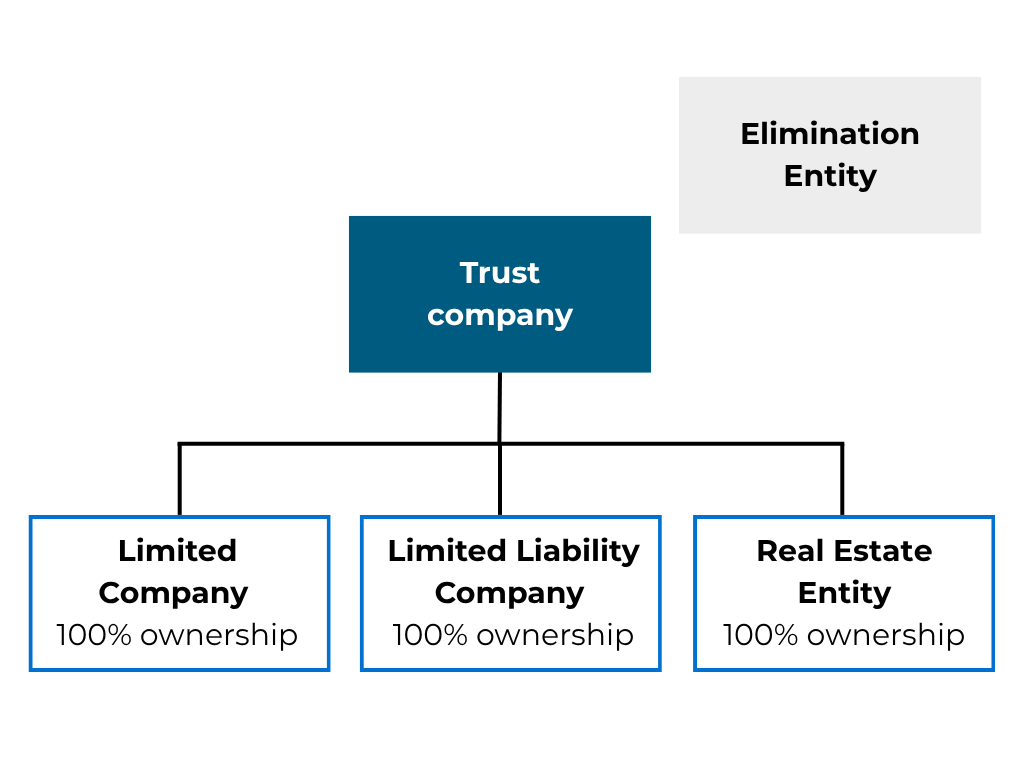
While every organization is different, those aligned to this maturity level often involve one parent or trust company who owns 100% of all entities.
2. Domestic Consolidations: Standardization and Speed
As organizations expand within a single currency, the next stage is typically domestic consolidation. This stage introduces:
Automated intercompany eliminations
Real-time consolidation reporting
Improved audit trails and transparency
While the structure of your entity may match that of the above image, the key difference is technology enablement. Instead of manually recreating entries each month, Sage Intacct handles the processing, allowing finance teams to focus on review and analysis.
Success depends on disciplined design. Without consistent intercompany account structures, even month end reconciliations can still be a challenge.
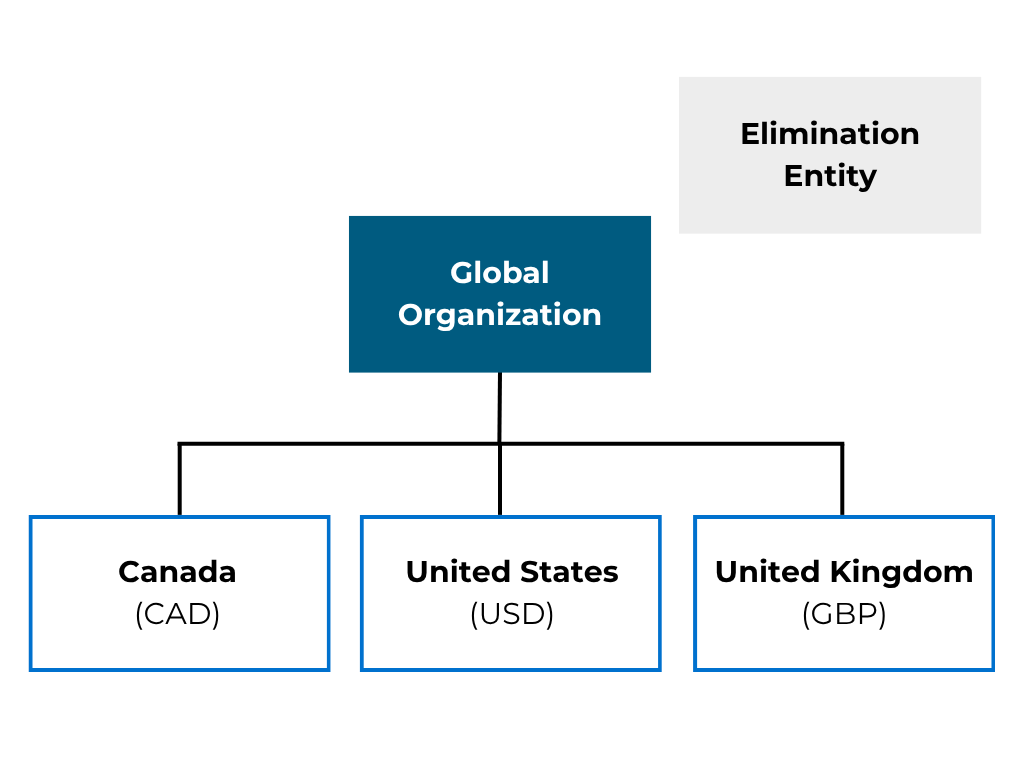
3. Global Consolidations: Managing Currency Complexity
When organizations operate across multiple currencies, consolidation becomes significantly more complex.
Global capabilities enable:
Currency translation into a single reporting currency
Auto-generated entries to record currency translation gains and losses
Multiple reporting views, such as local and global
At this stage, finance teams gain a more complete view of performance. At the same time, policy decisions, such as foreign exchange treatment, become critical to maintain consistency and trust in reporting.
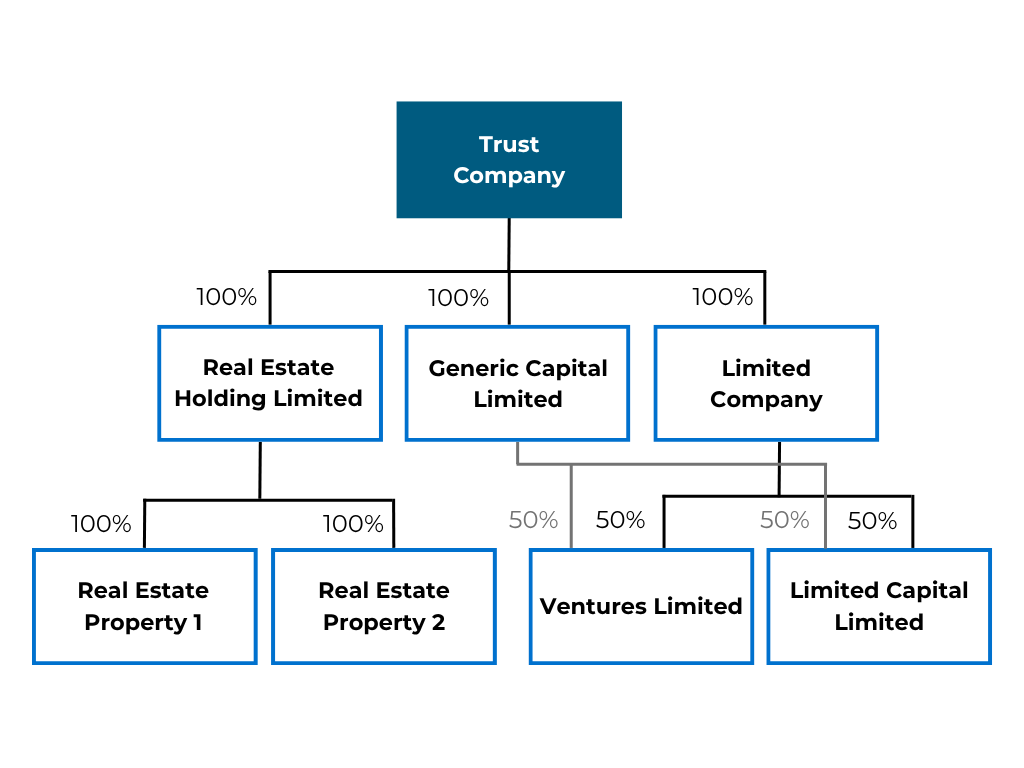
Organizations with partial ownership or multi-level hierarchies require more sophisticated consolidation approaches. Advanced Ownership functionality within Sage Intacct supports:
Partial ownership calculations
Multi-tier entity roll-ups
Equity method accounting
Dynamic ownership structures over time
These capabilities are essential for accurately reflecting complex organizational structures, particularly in private equity-backed or multi-generational family offices. CrossCountry has explored how these structures apply specifically to family offices using Sage Intacct.
How should finance teams approach consolidation improvement?
The most effective consolidation improvements share a common pattern: they address process design before configuration changes. Automation accelerates what already works; it amplifies what does not. High-performing finance teams consistently do the following:
Standardize intercompany structures early to reduce downstream reconciliation complexity
Use repeatable journal frameworks instead of rebuilding entries from scratch each period
Establish a defined month-end close process with clear ownership and documented steps
Use reporting tools intentionally to validate consolidation outputs, not just display them
When organizations align their Sage Intacct configuration to their actual consolidation maturity stage, close cycles accelerate, data becomes more reliable, and finance leadership gains faster access to the insights that drive decisions. The goal is not just a faster close; it is a more useful one. CrossCountry Consulting can help you get there.
Sage Intacct’s R2 2026 release introduces a wide range of enhancements designed to improve visibility, streamline workflows, strengthen controls, and expand automation capabilities across the platform. Here’s a recap of the key updates included in this release.
Ready to maximize the value Sage Intacct can deliver to your business? View our demo of key updates:
Administration, Import Service, and AI
Several key R2 updates focus on improving administrative visibility, data management, and AI-driven workflows.
Roles and Permissions Reporting
One of the most practical additions in R2 is the new standard Roles and Permissions Report. Previously, administrators often had to cross-reference multiple screens or build custom reports to review role access across Sage Intacct.
The new report consolidates all assigned permissions into a single point-in-time snapshot, making it easier to validate user access, support audit preparation, and confirm both standard and custom permissions across modules.
Expanded Import Service Functionality
Sage Intacct continues investing in its modern Import Service, which centralizes and simplifies data imports with validation, preview, rollback, and AI-assisted mapping capabilities.
R2 introduces two new beta import options:
AR Advances imports for creating and updating AR Advances
Ownership Structure imports for consolidation ownership structures and periods
These enhancements are especially valuable for organizations managing complex multi-entity or advanced consolidation environments. (Note: Beta features are available through opt-in programs. Sign up for Beta access here.)
AI Gateway and AI Connectivity
A major innovation in this release is the introduction of the AI Gateway, a secure connectivity layer that allows organizations to connect Sage Intacct data with external AI tools and large language models (LLMs).
Using REST APIs and Model Context Protocol (MCP) connectivity, organizations can securely connect platforms like ChatGPT or Claude to Sage Intacct in a governed, permission-based framework. This enables users to query financial data using natural language and build custom AI-driven workflows and dashboards outside the native Sage Intacct environment.
AP Automation Improvements
R2 also includes several usability improvements for AP Automation.
Users can now switch between summarized bill entries and detailed line-item views directly while reviewing AP bills, rather than being locked into a format selected during upload.
Organizations using both AP Automation and Purchasing Automation can also now manage uploaded transactions from a single automated transaction list, simplifying workflow management and exception handling.
Accounts Receivable, Cash Management, and Order Entry Updates
AR Refunds Processed Through AP
One of the standout AR enhancements is the ability to process customer refunds directly through Accounts Payable.
Instead of issuing refunds offline, organizations can now generate AP bills tied directly to AR refunds, credit memos, or advances. This strengthens separation of duties by allowing AR teams to initiate refunds while AP teams manage disbursements and approvals.
Multi-Currency Payment Visibility
R2 also improves visibility into multi-currency transactions by displaying transaction, base, and bank currencies throughout posted payments, registers, and ledgers in both AP and AR.
Cash Management Controls
Additional cash management enhancements include:
Expanded entity-based restrictions for bank transaction visibility
Validation rules preventing duplicate debit and credit account usage
Improved reconciliation workflows by removing automatic default transaction dates
Order Entry and Billing Group Improvements
Building on the Billing Groups functionality introduced in R1, Sage Intacct added several enhancements in R2:
New billing frequencies, including semi-monthly and end-of-month schedules
Improved navigation for Billing Groups
New individual charge functionality for one-time charges within recurring billing groups
Enhanced customer visibility into assigned billing groups
These updates help organizations manage recurring billing arrangements more flexibly and efficiently.
Fixed Assets Management Enhancements
Fixed Assets Management saw some of the most significant updates in the R2 release.
Key enhancements include:
Splitting a single asset into multiple assets directly within the asset record
Reverting partial disposals without manual journal entries
Adding capitalization dates for CIP assets
Reverting capitalization transactions
Reversing depreciation postings while maintaining audit history
Summarized depreciation journal entries to reduce GL volume
Organizations should pay particular attention to the new Correction Treatment configuration setting, which determines whether the system uses “revert” or “reverse” functionality for corrections and impacts feature availability.
Purchasing, Projects, and Inventory Updates
R2 also delivers updates for organizations managing purchasing workflows, project reporting, and inventory operations.
Enhanced Three-Way Matching
Purchasing Automation now supports enhanced three-way matching capabilities with line-level validation between purchase orders, receivers, and invoices. Users can review quantity and price variances directly within automated transactions before posting.
Project Currency Visibility
Organizations using project accounting can now display project summaries in alternate transaction currencies instead of only viewing balances in the base entity currency. This provides additional visibility for multinational and multi-currency operations.
Inventory Transfer Changes
Sage Intacct also announced that legacy inventory transfer-in and transfer-out transaction definitions will be deprecated. Organizations still using those legacy workflows are encouraged to transition to the newer warehouse transfer functionality, which simplifies processing and improves efficiency.
Looking Ahead
The R2 2026 release continues Sage Intacct’s focus on automation, auditability, AI connectivity, and operational efficiency. Review the release notes and evaluate how these features align with your organization’s priorities. CrossCountry Consulting’s Sage Intacct experts can help you assess impact, manage adoption, and maximize the value of your investment. Contact us today to get started.
The 2026 Sage Intacct R1 release delivers high-impact enhancements designed to elevate automation and precision for finance departments. For administrators and power users leading digital initiatives, these updates streamline core operations, bolster internal controls, and significantly accelerate the month-end close.
Ready to maximize the value Sage Intacct can deliver to your business? View our demo of key updates:
Cash Management: Streamlined and Accurate
Simplified check printing: Check printing is now easier to configure with a context-driven interface that eliminates unnecessary fields and streamlines setup for company address and logo. Key features include:
Dynamic field display based on selections.
Address fields only appear when selecting “Use a different address”.
One-click logo uploads.
Improved bank reconciliation with document numbers: A new Document Number field on Bank Interest and Charges now links fees with related transactions for better traceability. This improves bank reconciliation by matching payments and fees with shared identifiers, saving time, and improving audit trails.
Unified transaction management: Imported bank transactions via Bank Transaction Assistant now flow directly to the Banking Cloud tab, consolidating all banking activity in one place and simplifying reconciliation workflows.
Multi-entity bank register enhancements: Bank register report now auto-populates entity location filter within entities, saving time and reducing errors in multi-entity environments.
General Ledger: Advanced Reconciliation Capabilities
Organizations can now reconcile balance sheet accounts, tracking debit and credit activity systematically. High-value use cases include prepaid expenses, payroll clearing, accrued expenses, and fixed assets. The GL Account Reconciliations Activity report provides visibility into matched and unmatched transactions, improving accuracy and audit readiness.
Accounts Receivable: Better Customer Insights
Three new fields added to the customer record – health score, health status, and churn risk – allow teams to track customer account health. Use these insights for renewal risk identification, credit risk assessment, and prioritizing collections to improve revenue retention.
Additionally, new billing groups streamline recurring invoicing by allowing organizations to group customers with similar billing needs and automate invoice generation on a defined schedule. Teams can set start dates, limit occurrences, review invoices before posting, and monitor run results, including detailed errors. The feature supports non‑inventory items, requires future‑dated schedules, and includes new permissions for access control, reducing manual work while preserving flexibility.
Fixed Asset Management: Full Lifecycle Tracking
Construction in Progress (CIP) support: CIP functionality tracks asset acquisition costs from initial spending through capitalization, streamlining visibility and transitions to active asset status.
Asset cost adjustments: Teams can now adjust asset costs post-service using AP memos, addressing errors, capital improvements, or revaluations, with full transparency in the cost adjustments tab.
Roll-forward reports: New roll-forward reports provide clear visibility into asset cost, depreciation, and net book value changes over periods, supporting GL to sub-ledger reconciliation.
Flexible GL account assignment: Organizations can now assign the same GL account to multiple asset classifications, simplifying chart of accounts management.
End-to-end Sage Intacct value creation with an expert implementation and advisory partner
Simplify and transform financial management processes, automate key workflows for scale, and generate real-time enterprise insights for faster decision-making.
Enhanced VAT/GST display: Order entry and purchasing transactions now consolidate net amounts and tax totals into a single line for better clarity.
Custom tax reports: Organizations can create tailored tax reports using configurable detail boxes and rules, streamlining compliance for jurisdictions with complex tax requirements.
Automation and Efficiency: Smarter Tools
AI-powered import tools: Enhanced import capabilities include automated field mapping, data transformation, and preview functions, reducing manual data prep and improving accuracy.
Predictive tax details: AP automation predicts tax details at the line level using historical trends, speeding up invoice processing and reducing errors.
Secure email enhancements: A new allowed email addresses list strengthens security by ensuring outgoing emails originate from approved sources, reducing phishing risks.
AP automation improvements: Improvements include auto-forwarding, broader file format support, and predictive text-based transaction creation, streamlining AP processes for high-volume operations.
Bulk-update projects: Users can bulk‑update multiple projects at once, adjusting shared fields via a background job with email confirmation. Additionally, projects can link directly to CIP assets, automatically connecting transactions to streamline capitalization tracking and reduce reconciliation effort.
Dynamic allocations: In the GL, a single allocation definition can now cover an entire account group and automatically include newly created accounts, minimizing maintenance for organizations managing large, multi‑entity expense structures.
Purchasing and AP: Advanced Tools
Multi-currency close automation: Close automation is now supported for multi-base currency organizations, enabling faster, more reliable reconciliations globally.
Line-level PO matching: Three-way matching now works at the line level for purchase orders, receivers, and invoices, improving accuracy and reducing manual intervention.
Centralized AP advances: Multi-currency organizations can now manage AP advances at the top level, simplifying workflows and improving consistency.
Recurring transaction notifications: Automatic email alerts notify teams of failed recurring transaction schedules, ensuring timely issue resolution.
Moving Forward
Sage Intacct R1 updates empower CFOs to optimize operations, improve controls, and gain strategic insights. Review the release notes and align features with your priorities in 2026 and beyond. CrossCountry Consulting’s Sage Intacct implementation experts can help you capitalize on the latest updates to maximize your investment. Contact us today to get started.
Sage Intacct is designed to evolve alongside your business. With quarterly product releases and continuous innovation, organizations that actively manage and optimize their Sage Intacct environment consistently realize greater efficiency, stronger reporting, and a higher return on investment.
Yet many organizations still approach Sage Intacct reactively – adopting new features sporadically and relying on legacy configurations that no longer reflect how the business operates. Ensure your Sage Intacct ERP scales with your organization with these best practices:
1. Establish a Quarterly Sage Intacct Release Management Process
Sage delivers new functionality every quarter across financial management, reporting, automation, and integrations. Without a structured review process, valuable enhancements often go unused.
Best practice: Implement a formal quarterly release review that includes:
Reviewing Sage Intacct release notes relevant to your modules.
Evaluating new features against current pain points.
Identifying process, reporting, or automation opportunities.
Assigning clear ownership for adoption and change management.
Organizations with a defined release management process are better positioned to reduce manual work, avoid unnecessary customizations, and stay aligned with Sage’s product roadmap.
End-to-end Sage Intacct value creation with an expert implementation and advisory partner
Simplify and transform financial management processes, automate key workflows for scale, and generate real-time enterprise insights for faster decision-making.
2. Ensure Your Sage Intacct Configuration Reflects Today’s Business
Most Sage Intacct implementations are designed for a specific moment in time. As companies grow and evolve, the original configuration may no longer support current operational needs.
Best practice: Periodically reassess whether your chart of accounts, dimensions, workflows, and reports still reflect how the business actually operates, not how it operated at go-live.
3. Define Clear Ownership and Governance for Your ERP
Sage Intacct often sits at the center of finance, operations, and leadership decision-making. Without defined governance, enhancements stall and inefficiencies compound over time.
High-performing organizations clearly define:
ERP strategy ownership versus day-to-day administration.
A structured intake and prioritization process for enhancements.
When to leverage external Sage Intacct advisory support.
Best practice: Treat ERP governance as an ongoing discipline so the platform continues to deliver value as the business scales.
4. Get a Sage Intacct Health Check
Even well-managed environments benefit from an independent review. A Sage Intacct Health Check provides an objective assessment of how effectively your system is configured, utilized, and integrated within the broader business ecosystem.
Best practice: Conduct a Health Check every 2-3 years, or following major events such as:
Rapid growth or organizational change.
M&A activity.
Leadership or strategy shifts.
Persistent close, reporting, or data challenges.
A comprehensive Sage Intacct Health Check goes beyond core configuration and includes a holistic review of how Sage Intacct supports end-to-end business processes.
This often includes assessing:
Core configuration and dimensional structure to ensure scalability and reporting flexibility.
Reporting, dashboards, and data accuracy, including executive and operational visibility.
Automation opportunities and manual workarounds that impact close, billing, or reconciliations.
Customizations, integrations, and technical debt, with a focus on long-term maintainability.
How Sage Intacct interacts with upstream and downstream systems, such as CRM, billing platforms, payroll, AP automation, or data warehouses.
Cross-system business processes that traverse Sage Intacct, including Order-to-Cash (O2C), Procure-to-Pay (P2P), revenue recognition, and financial close.
In many cases, inefficiencies are not isolated to Sage Intacct itself but arise at the intersections between systems, where data handoffs, ownership, or controls may be unclear or outdated.
The outcome of a Health Check is a prioritized optimization roadmap, helping organizations address immediate risks while positioning Sage Intacct and the surrounding systems to support future growth.
5. Embed a Culture of Continuous Optimization
Organizations that get the most from Sage Intacct view optimization as continuous rather than episodic.
Best practice: High-performing finance teams consistently improve efficiency, strengthen reporting, and avoid costly re-implementations by combining:
Family offices managing diverse investment portfolios, intricate entity structures, and the sensitive dynamics of generational wealth are limited by traditional, spreadsheet-heavy accounting methods. Every manual process takes time and resources away from strategic decision-making and creates unnecessary risk.
That’s why family offices are modernizing their financial tech stack, moving from outdated systems like QuickBooks to robust platforms like Sage Intacct. CrossCountry Consulting’s Megan Smith recently joined leaders from Sage Intacct, Spyglass Capital, and Scott Holdings to discuss how family offices are approaching this transition and the value they’re generating along the way.
View the on-demand webinar here:
Navigate Complexity With Confidence
Sage Intacct empowers family offices with real-time visibility, automated consolidations, and key systems integrations. This enables investors and managers to transform the finance function from reactive cost center to proactive strategic partner, providing clarity in a world of complexity.
The true power of Sage Intacct lies in its ability to handle complicated ownership structures and sophisticated reporting requirements.
As a multi-entity, cloud-based accounting solution that scales with organizational growth, Sage Intacct offers dimensional reporting, which allows for granular analysis across various metrics, family members, and trusts. This flexibility is crucial for family offices that often manage dozens, or even hundreds, of entities.
“We actually have 151 entities on the platform today,” noted Keith Varney, CFO at Scott Holdings, on transitioning to Sage Intacct. “We have saved so much time in this process of being able to come up with an allocation method to take the complex ownership structures that are in place and get these results each month, and we’ve cut down significantly our time in our closing process.”
Handling this volume in a system like QuickBooks involves tedious, error-prone manual work. With Sage Intacct, the process is streamlined into a single login, providing access to all entities and automating intercompany transactions.
Modernizing Your Financial Tech Stack
Implementing a solution like Sage Intacct is more than a software upgrade; it’s a fundamental transformation of financial operations. The benefits are immediate and far-reaching, enabling a new level of strategic insight and operational efficiency.
Gain Real-Time Visibility
The most significant advantage of a modern financial platform is access to real-time data. Dashboards in Sage Intacct can be customized to provide key stakeholders – from the CEO to trustees – with instant visibility into the metrics that matter most.
Kristen Brugos, Director of Accounting and Finance at Spyglass Capital, highlights this benefit: “Our CEO actually logs into Sage and looks at the different dashboards. I’ve also created a profits interest dashboard. Previously, that was all done in Excel.” This shift empowers leadership with the confidence that they’re making decisions based on accurate, up-to-the-minute information.
Automate Complex Consolidations
Family offices often deal with layered ownership structures that make consolidations a nightmare in spreadsheets. Sage Intacct’s Advanced Ownership Consolidations and Dynamic Allocations modules are purpose-built to automate these complex processes. This automation saves time and significantly improves the accuracy of financial reporting, which is critical to fulfilling fiduciary responsibilities.
Create an Integrated Technology Ecosystem
An effective financial tech stack operates as a connected ecosystem, not a collection of siloed applications. Sage Intacct is built with an open API, allowing seamless integration with other critical systems like investment management software (e.g., Addepar), bill pay solutions (e.g., Bill.com), and document management platforms (e.g., SharePoint).
This integration eliminates redundant data entry and creates a single source of truth for financial data. The result is a more efficient workflow and more reliable reporting, which enhances collaboration with external partners like auditors and tax providers.
The Path to Financial Clarity
Modernizing your family office’s financial operations with Sage Intacct provides the tools necessary to manage complexity, drive efficiency, and deliver strategic value. The ability to automate processes, gain real-time visibility, and create a connected tech stack transforms the finance function, allowing you to focus on growth and strategy rather than manual data entry.
With a dedicated practice of Sage Intacct implementation experts, CrossCountry Consulting helps family offices maximize the value of their investment and achieve strategic objectives. To get started, contact us today.
Are you still managing multi-tiered ownership structures, intercompany eliminations, and partnership payouts with spreadsheets and manual calculations? For family offices contending with increasing complexity in their entity structures, the traditional approach to partnership accounting is inefficient and a strategic liability.
To navigate multi-generational wealth structures, private equity investments, and evolving regulatory requirements, leaders are turning to Sage Intacct, which offers the ability to accurately and efficiently allocate partnership income.
To remain ahead of the complexity curve, how effectively can you modernize allocation processes and implement scalable systems?
The Partnership Accounting Challenge: Beyond Traditional Methods
Consider this typical scenario: A family office manages 15 different partnership entities across three generations, with ownership percentages that change quarterly based on new investments and distributions. Each entity generates income from multiple sources – rental properties, private equity investments, and liquid securities – all requiring precise allocation to partners with varying ownership stakes.
The traditional approach of manual calculations and static allocation methods breaks down quickly. More concerning, it introduces significant risk exposure through calculation errors and compliance gaps that can have material financial and reputational consequences.
Strategic Framework: 3 Pathways to Allocation Excellence
1. Transaction-Level Allocation: The Foundation Strategy
Transaction allocation serves as the cornerstone for partnerships with stable ownership structures. This method applies allocation percentages at the individual transaction level, making it ideal for entities where ownership changes infrequently and transparency is paramount.
Strategic Applications:
Single-tier partnerships with consistent ownership.
Real estate ventures with fixed partner percentages.
Investment vehicles with established profit-sharing agreements.
Key Benefits:
Complete audit trail for every allocated transaction.
Real-time visibility into partner distributions.
No additional licensing costs (part of core ERP functionality).
End-to-end Sage Intacct value creation with an expert implementation and advisory partner
Simplify and transform financial management processes, automate key workflows for scale, and generate real-time enterprise insights for faster decision-making.
For organizations managing multi-tier structures with frequently changing ownership percentages, dynamic allocation provides the automation and flexibility necessary to maintain accuracy while reducing administrative burden.
This advanced approach enables CFOs to establish allocation rules based on various criteria – statistical accounts tracking ownership percentages, fair market value calculations, or financial account balances – and automatically apply these rules across multiple entities and time periods.
Strategic Applications:
Multi-generational family office structures.
Private equity funds with diverse investor bases.
Partnership entities with quarterly ownership adjustments.
Key Benefits:
Automated journal entry generation with full audit trails.
User-defined books for allocation tracking are separate from operational accounting.
Batch processing capabilities for multiple partnerships simultaneously.
Real-time validation and error checking.
3. Advanced Ownership Consolidations: The Reporting Revolution
Advanced ownership consolidations address the critical need for comprehensive wealth reporting across complex entity structures where partial ownership interests create consolidation challenges.
This functionality enables family offices to generate accurate net worth statements that reflect proportional ownership across multiple tiers of entities, providing the strategic visibility required for wealth planning and investment decision-making.
Strategic Value Propositions:
Complete family wealth visibility across all entity levels.
Accurate proportional consolidation for minority interests.
Automated validation and reconciliation processes.
Enhanced due diligence capabilities for external stakeholders.
Implementation Strategy: Aligning Technology with Business Requirements
Assessment Framework
The selection of appropriate allocation methodologies requires careful analysis of your organization’s specific requirements:
Complexity Indicators:
Number of partnership entities under management.
Frequency of ownership percentage changes.
Reporting requirements for external stakeholders.
Volume of transactions requiring allocation.
Strategic Considerations:
Growth trajectory and anticipated entity additions.
Regulatory compliance requirements.
Integration needs with existing systems.
Resource allocation for implementation and maintenance.
Best Practices for Implementation Success
Phase 1: Foundation Building Establish clear entity structures within your ERP system, ensuring proper dimension setup for partners, investments, and allocation tracking. This foundation work is critical for all subsequent allocation processes.
Phase 2: Allocation Rule Configuration Develop and test allocation definitions based on your partnership agreements and ownership structures. Utilize statistical accounts for tracking ownership percentages that change over time.
Phase 3: Process Automation Implement automated workflows for periodic allocation processing, whether monthly, quarterly, or annually. Build in validation checkpoints to ensure accuracy before posting allocation entries.
Phase 4: Reporting Integration Configure reporting tools to provide clear visibility into allocation results, partner equity balances, and distribution requirements. Ensure reports support both internal management needs and external stakeholder communications.
Technology Integration: Maximizing Efficiency Through Automation
Modern partnership accounting extends beyond standalone ERP functionality to encompass integrated ecosystems that automate data flow from investment management systems, custodial platforms, and external data sources. Middleware tools, such as KnowLedger, leverage Sage Intacct’s open API to integrate investment data to enable streamlined, high-level reporting directly within your ERP system.
KnowLedger Integration Capabilities:
Automated transaction import from investment management systems.
Real-time application of allocation rules to incoming transactions.
Consolidated journal entry creation with full allocation detail.
Exception handling and validation processes.
This integration approach eliminates manual data entry, reduces processing time, and ensures consistent application of allocation rules across all partnership entities.
Modern allocation systems must provide comprehensive audit capabilities that trace every allocation from source transaction through final partner distribution. This includes:
Complete transaction lineage documentation.
Allocation calculation validation and verification.
Partner notification and approval workflows.
Regulatory reporting compliance features.
Error Prevention and Detection
Automated validation processes should include:
Mathematical accuracy verification for all allocations.
Ownership percentage reconciliation against legal documents.
Distribution calculation validation before processing.
Exception reporting for transactions requiring manual review.
The Strategic Imperative: Future-Proofing Your Partnership Accounting
As partnership structures continue to evolve and regulatory requirements increase, the organizations that thrive will be those that have invested in scalable, automated allocation systems.
Key Success Metrics:
Reduction in month-end close time for partnership entities.
Elimination of allocation calculation errors.
Improved partner satisfaction through timely and accurate reporting.
Enhanced audit readiness and compliance confidence.
Scalability to support organizational growth without proportional resource increases.
Taking Action: Your Path to Allocation Excellence
Ready to transform your partnership accounting processes and eliminate the risks of manual allocation methods? Discover how Sage Intacct’s comprehensive allocation capabilities can streamline your operations while ensuring accuracy and compliance. Contact CrossCountry Consulting to learn more.
The final Sage Intacct release of 2025, R4, delivers a powerful suite of enhancements designed to accelerate financial close, strengthen data integrity, and boost team efficiency – critical factors as we head into year-end planning.
This release focuses on smarter automation, faster reconciliation, and more flexible reporting across key modules. Ready to maximize the value Sage Intacct can deliver to your business? View our demo of key updates:
Training and Collaboration Enhancements
The Help Center now features an expanded, easy-to-search video library, offering both short-form guides for quick fixes and longer-form tutorials. This is an ideal resource for onboarding new team members and supporting ongoing education. Additionally, Sage Collaborate officially replaces Intacct Collaborate in November 2025. While the interface remains familiar, this update is a strategic foundation for future communication and feature enhancements.
Import Service Upgrades
Users can now update key dimension IDs – including GL accounts, classes, and vendors – via the new Import Service. This eliminates the need for manual workarounds for simple ID changes. The new Import Service provides a massive time-saver by allowing for real-time error handling and fixing import issues directly within the import interface without needing to re-upload the file multiple times.
Cash Management Improvements
A major update allows users to combine debits and credits in reconciliation matching rules. This is particularly useful for transactions split between a main payment and an associated fee (like bank charges), enabling a much higher rate of accurate and automated bank reconciliations.
1099 Tax Reporting Updates
Ensure compliance ahead of the 1099 season with necessary form adjustments. Sage Intacct has implemented the IRS change moving Golden Parachute Payments from Box 14 to Box 3 on the 1099-NEC form. Also, to ensure proper printing and compliance, entity-specific 1099s now require an assigned contact with a valid address. This simple check prevents common printing and mailing errors.
Accounts Payable and AP Automation
Gain better control and traceability over vendor activity and payment processing. The AP Ledger report now supports multi-vendor filtering and custom vendor groups, significantly enhancing your reporting flexibility for focused analysis on specific vendors. Additionally, the introduction of unique payment IDs for AP advances improves financial traceability across reports, making it easier to reference and track prepayments. Also, AP automation benefits from a new email domain (@AISage.com), facilitating highly requested features like setting up auto-forwarding, receiving bounce-back notifications, and supporting expanded file formats.
Accounts Receivable Enhancements
Customer statements now offer more granular transaction filtering options. Users can tailor statements to show all transactions, only open invoices, or show invoices with associated credits providing greater clarity and customization to your customers.
Fixed Asset Management and General Ledger
Reduce manual entries with Sage Fixed Assets Management (SFAM) and gain deeper visibility into your financial status. Users can now partially dispose of assets, create multiple assets from a single bill line, or skip asset creation. Dimension edits no longer require asset transfers within the same entity, eliminating unnecessary journal entries. In addition, the General Ledger report now includes unposted transactions and a new “Transaction State” column. This provides immediate, real-time visibility into draft and adjusting entries, significantly aiding your close process.
Contracts, Purchasing, and Consolidations
Contract renewal management is now more efficient, benefiting from automated bulk actions and new tracking reports for enhanced visibility into recurring revenue. In Purchasing, you gain greater control and quicker resolution thanks to an exception summary for match tolerances. Furthermore, AP Automation for Purchasing now supports more detailed line-level matching. Finally, for complex corporate structures, Advanced Ownership Consolidation has been expanded to include crucial equity consolidation methods.
Overall, Sage Intacct R4 delivers meaningful improvements that enhance efficiency, accuracy, and user control across financial operations. CrossCountry Consulting’s Sage Intacct implementation experts can help you capitalize on the latest updates to maximize your investment. Contact us today to get started.
The latest Sage Intacct R3 release delivers powerful enhancements designed to accelerate finance transformation initiatives while reducing operational complexity. These updates provide CFOs with the strategic tools needed to drive efficiency, enhance decision-making capabilities, and maintain competitive advantage now and in the future.
To see how your organization can maximize the value of your Sage Intacct instance, view the demo of key updates from CrossCountry Consulting’s Sage Intacct implementation experts.
Key Strategic Enhancements in Sage Intacct R3
AI-Powered Operational Intelligence
“Search Help with Copilot” is an AI-powered support feature that makes it faster and easier to find answers in the Sage Intacct Help Center. It reduces repetitive searches and offers intelligent suggestions for related topics, helping users gain deeper insights and work more efficiently.
Enhanced Email Security and Reliability
To ensure continued email delivery through Sage Intacct, all customers using a custom email domain must authenticate and validate their domain with the enhanced email delivery service. This is a required step that improves deliverability, protects against phishing, and aligns with email security best practices. Please have your Sage Intacct administrator work with your email administrator to complete the necessary DNS setup as soon as possible.
Efficient AP Processing Through Delegated Approvals
Advanced delegation capabilities for accounts payable (AP) approvals eliminate bottlenecks in your approval processes. This feature enables continuous operations even when key approvers are unavailable, supporting business continuity while maintaining proper financial controls. The system automatically manages AP bill approval routing, reducing manual intervention and associated delays.
Advanced List Management and Data Visualization
Enhanced list views with split-screen functionality and dynamic column management enable faster data analysis and decision-making. These improvements reduce the time your team spends navigating between screens and provide more intuitive ways to access and analyze critical financial information.
End-to-end Sage Intacct value creation with an expert implementation and advisory partner
Simplify and transform financial management processes, automate key workflows for scale, and generate real-time enterprise insights for faster decision-making.
Streamlined Vendor Payments with MineralTree Integration
Sage Intacct has partnered with MineralTree to offer a more seamless way to pay vendor bills directly. The integration with MineralTree provides a comprehensive solution for payment processing, offering multiple payment methods including ACH, check, and virtual card options. If you use AP Automation, you can add Vendor Payments to your existing automated transaction and approval workflows for a complete end-to-end automation solution.
Simplified Payments and Credit Application from Lists
You can now pay vendors and customers directly from their respective lists, eliminating extra navigation and improving team efficiency. Additionally, credits can also be applied directly from the AR Adjustments and AR Advances lists, further reducing processing time and manual effort for routine transactions.
Accounts Receivable and Cash Flow Optimization
R3 introduces customer refund functionality that streamlines cash management processes and improves working capital efficiency. This enhancement eliminates manual journal entries and provides better audit trails for refund transactions, supporting both operational efficiency and compliance requirements.
New filtering capabilities in AR Ledger reporting enable more sophisticated cash flow analysis, allowing CFOs to quickly identify trends and potential issues across customer groups and payment patterns.
Fixed Assets and Capital Management
Sage Fixed Asset Management enhancements include bulk update capabilities and more flexible historical depreciation handling. These improvements support more efficient asset lifecycle management and provide better data accuracy for financial reporting and tax compliance.
The new cumulative depreciation reporting feature enhances visibility into asset values and depreciation trends, supporting more informed capital allocation decisions.
Smarter Purchasing Workflows and New eProcurement
This release brings key enhancements to purchasing and procurement workflows. You can now consolidate multiple purchasing documents into a single transaction, automate vendor invoice processing without purchase order (PO) matching, and access clearer match tolerance exception histories. The new eProcurement product also simplifies procurement by integrating vendor catalogs and automating purchase order creation directly within Sage Intacct.
Enhanced Contract Management and Flexibility
Users can now reassign dimensions (e.g., department, class) for in-progress contracts with posted transactions, eliminating the need for journal entries. Reversal dates for accounts receivable (AR) payments can also be edited, offering greater flexibility for corrections. These updates exclude contracts with revenue recognition or specific statuses like canceled or renewed.
Improved Project Task Management and Revenue Recognition
Standard tasks can now be added to projects in bulk, reducing manual effort. Enhanced revenue recognition features allow users to preview and update percent-complete schedules before posting, improving control and accuracy. These updates streamline project management and ensure better visibility into financial progress.
Preparing Your Organization for R3 Implementation
System Preparation Steps
Configuration review: Assess current system settings and identify areas where new features can be implemented.
User training planning: Develop training programs to ensure team members can leverage new capabilities effectively.
Process documentation: Update existing procedures to incorporate enhanced workflows.
Testing protocol: Establish testing procedures for new features before full deployment.
Team Readiness
Successful R3 adoption requires coordinated change management across your finance organization. Focus on identifying power users who can champion new features and provide peer-to-peer training. Consider the impact on existing workflows and plan for gradual feature adoption to minimize disruption.
Next Steps: Strategic Implementation
To fully capitalize on the R3 release benefits, CrossCountry Consulting’s certified Sage Intacct specialists can help you identify which features align with your strategic priorities and develop an implementation roadmap that maximizes value while minimizing disruption.
Sage Intacct’s latest release, R2, delivers a robust set of enhancements designed to optimize financial management across various modules. To see how your organization can maximize the value of your Sage Intacct instance, view the demo of key updates from CrossCountry Consulting’s Sage Intacct implementation experts.
And for a rundown of changes to be aware of, our team has distilled important updates below:
A significant security upgrade arrives with Email Sender Domain Authentication. For companies sending emails from their own domain via Sage Intacct (invoices, order confirmations, etc.), configuring this feature is now crucial. It fortifies email security and ensures reliable delivery to customers. The setup involves authenticating your domain within Sage Intacct and updating your email service provider’s DNS records.
Streamlined Data Handling: The New Import Service
Data import processes are revolutionized with the New Import Service. This tool offers real-time error feedback, template-based imports, intelligent header mapping, and in-line editing capabilities. It currently supports importing and updating data for core dimensions like Locations, GL Accounts, Departments, and Classes, with a beta program for Vendors and Customers, promising a more efficient and user-friendly import experience.
Enhanced AP Workflows: Simplified Bill Approvals
Accounts Payable workflows are simplified with the separation of bill approval rule types from named users. This eliminates clutter in policy setup, allowing for clearer definition of approval rules based on criteria like vendor or amount, while specific approvers are now assigned under a dedicated “User Level” rule type.
Shared AP/AR Controls: Warnings and Import Security
Shared updates for both AP and AR enhance control and accuracy. A new warning message alerts users when attempting to void or reverse reconciled transactions, preventing unintended disruptions. Additionally, security for CSV imports of posted AP and AR adjustments and AR invoices are strengthened, now requiring “Post” permissions, ensuring greater data integrity.
AR Advancements: Statements, Refunds, and Page Updates
Accounts Receivable sees notable advancements, including the display ofexternal credits (adjustments, negative invoices)on entity-level statements, ensuring perfect alignment with AR ledgers and aging reports. The retirement of the classic “Receive a Payment” page has been delayed, and an exciting new feature for recording customer refunds directly within AR is on the horizon for early adopters, promising a streamlined refund process.
The Financial Report Writer gains intelligence by analyzing report structures and offering performance optimization recommendations upon saving. This helps users identify and address potential bottlenecks, leading to more efficient and insightful reporting.
Cash Management Evolution: Imports and Credit Card Control
Cash Management receives significant attention with the impending retirement of the classic bank transaction import functionality. Users are encouraged to transition to the enhanced Bank Transaction Assistant, which now supports importing credit card transactions. Furthermore, a newreclassify credit card transactionsfeature allows for the re-categorization of directly entered and paid credit card transactions, provided the feature is enabled in configuration and appropriate permissions are granted.
End-to-end Sage Intacct value creation with an expert implementation and advisory partner
Simplify and transform financial management processes, automate key workflows for scale, and generate real-time enterprise insights for faster decision-making.
Purchasing workflows benefit from the ability to hide prices on receiver transactions at the transaction definition level. This is particularly useful for scenarios in which receiving personnel only need to focus on quantities, enhancing efficiency and potentially safeguarding sensitive pricing information.
Streamlined Fixed Assets: Reporting, Lists, and Transfers
Fixed Asset Management continues to evolve with the addition of a Depreciation Roll Forward Report, exportable fixed asset lists, increased records per page options, an audit trail for each asset, and expanded capabilities for inter-entity asset transfers, now including the Entity dimension for top-level assets within the same base currency.
Enhanced Contracts: Summary, Payments, and Configuration
The Contracts module introduces a comprehensive Contract Summary tab, replacing the billing transaction tab, providing a holistic view of all contract-related activities. Users can now directly pay associated order entry invoices from this summary. While a feature to generate invoices directly from the contract list is temporarily unavailable, it’s slated for a near-term release. Additionally, users can now update custom fields on canceled contract lines, and a new configuration setting allows for automatic adjustment of GL posting dates for evergreen renewals falling into closed periods.
Time and Expense: Split Into 2 Applications
A key structural update involves the separation of Time and Expense into two distinct applications, independent from Projects. While time configuration continues to be managed within Project settings, the day-to-day entry and use of timesheets now take place within the new, dedicated Time application. Previously bundled as a single application, they each now have their own menu for easier access. Both applications remain included in your subscription, and this change is designed to enhance usability by making features easier to locate and navigate.
Smarter Consolidations: The Affiliate Entity Dimension
Finally, for organizations with multiple entities, the introduction of theAffiliate Entity standard dimensionin consolidations streamlines inter-entity reconciliation and reporting. Tagging transactions with the affiliate entity simplifies mappings and facilitates eliminations during consolidations.
Preparing for Upcoming Transitions
Sage Intacct R2’s powerful suite of enhancements emphasizes security, efficiency, user experience, and control. These updates empower finance teams with more robust tools and process efficiency to ensure maximum return on Sage Intacct investment. To better understand the latest ways Sage Intacct can drive value creation at your organization, contact CrossCountry Consulting.
Accounting and financial operations in a SaaS business model can be challenging for small- and medium-sized businesses without the right accounting software. Finance teams are often saddled with manual processes, countless spreadsheets, and unintegrated systems, meaning they can’t elevate beyond basic back-end activities.
What’s needed is a single source of financial truth that frees up valuable time and streamlines core tasks like subscription billing and revenue management. As the winner of five key categories in the 2025 SaaS CFO Tech Stack Report, Sage Intacct delivers on this promise, making it the cloud product of choice for SaaS leaders outgrowing their antiquated accounting software.
Looking to make the switch to Sage Intacct? Here’s what to expect:
Prebuilt Salesforce Integration
Real-time, bi-directional synchronization between Salesforce and Sage Intacct is pre-built on the Salesforce platform and maintained by Sage Intacct. The integration gives you a complete view of every customer, streamlined accounting workflows, and a smarter quote-to-cash process. The sales team will see the fundamental data they need in SFDC, such as how contract items are being billed and payment histories for their customers. The integration also eliminates the time-consuming rekeying of data and fosters productive communication between your sales and finance teams. Plus, it can automatically create contract records in Sage with a click of a button from Salesforce.
Similar Sage integrations with other CRMs like HubSpot generate comparable value for users as well.
Contract-Based Billing that Supports a Variety of Billing and Revenue Models
Position yourself for unified billing that’s automatically and directly driven from the contract record in your Sage Intacct environment. Sage Intacct supports unified billing across subscription pricing, usage billing, professional services, and perpetual licensing, which gives you the flexibility to handle a variety of models.
Automating a single revenue stream throughout the customer lifecycle can save your staff hours of calculations and reconciliations. The solution provides fully integrated contracts, billing, revenue recognition, collections, general ledger, and customer payment automation. Not only does Sage Intacct automate your routine revenue and billing schedules, but it also automates exceptions and less-routine activities such as add-ons, cancellations, holds, credits, and renewals.
Real-Time GAAP and SaaS Metrics Dashboards
A single source of truth across the subscription lifecycle, along with robust reporting tools and the ability to slice and dice your data, allows you to get real-time GAAP and SaaS metrics in a matter of seconds. Instantly track your successes using Intacct’s SaaS Intelligence module across SaaS metrics such as CMRR, churn, CAC, expansion/contraction, CLV, etc. and foundational financial reporting (Balance Sheet, P&L, cash flow, EBITDA, DSO, etc.).
When everything you need to forecast is in one place and derived from the contract record, you can automate forecasting to see cash, revenue, and billing from the original sales as well as upsells, downsells, and renewals. This frees you from the burden of manually updating and reconciling spreadsheets to generate financials.
Managing customer subscriptions requires capabilities beyond what legacy order-based financial systems can support. By shifting to Sage Intacct and an automated, single source of financial truth, your business can increase cash flow, reduce churn, produce better forecasts, and enable your teams to work together more efficiently. This will increase productivity, reduce costs, and result in a better customer experience throughout the process.
Sage Intacct 2025 R1 is packed with powerful features and enhancements designed to streamline your financial processes and boost efficiency. Centered around automation, control, and improved reporting capabilities, R1 delivers new ways to optimize financial management.
Vendor-based approval for bills: R1 2025 introduces vendor-based approvals, allowing you to assign specific approvers to each vendor. This granular control ensures invoices are routed to the right people, speeding up processing and reducing errors.
Prevent direct posting to specified journals: Reconciling subledgers with the trial balance just got easier. You can now prevent direct postings to specific journals, eliminating a common source of discrepancies and improving the accuracy of your financial reports. This provides tighter control over your GL and enhances auditability.
AP automation with purchasing: The new “AP Automation with Purchasing” add-on streamlines the entire purchasing process. It automatically drafts incoming vendor invoices and matches them to existing purchase orders and receivers, significantly reducing manual data entry and accelerating invoice processing.
Enhanced AR statements: Better communicate with customers and provide more personalized, informative statements by including header-level custom fields on customer, invoice, and AR adjustment objects.
Generate NACHA-compliant payment files: Sage Intacct now supports NACHA-compliant file formats, making it easier to upload payment files to your bank and improve the efficiency and security of your payment processes.
Critical Updates and Things to Know
While new features are exciting, it’s crucial to be aware of some upcoming changes that will impact your workflows:
Authenticate and validate your custom domain before May 2025: This is critical. If you send emails using a custom domain, you must authenticate and validate it before May 2025. This is due to Sage Intacct’s transition to an enhanced email delivery service. Failure to do so will likely result in email deliverability issues.
“Receive A Payment” retiring soon: The older “Receive A Payment” method is being retired in May 2025. If you’re still using it, now’s the time to switch to the new payment receipts method.
More flexibility for purchasing approval delegation: Delegation can be assigned to restricted users and be set up for a specific timeframe.
Transfer assets within an entity: With Fixed Assets Management, you must now transfer an asset to change an asset’s allocation or dimensions.
Security settings change for sales transaction definitions: Modified security settings offer restricted users added control of their draft sales transactions.
With their networks of investments and entities, family offices often grapple with the complexities of managing vast amounts of financial data. This can lead to inefficiencies, errors, and delayed decision-making.
However, Sage Intacct dimensions offer a powerful solution. In a recent presentation from CrossCountry Consulting’s Sage Intacct implementation team, Anne Costello and Jared Hand discussed how dimensions streamline family office operations and provide valuable decision-making insights. View the video for key takeaways and use cases.
Making Dimensions Work for Family Offices
Sage Intacct dimensions provide a framework to categorize and analyze financial data, transforming it into actionable intelligence. By tagging transactions with specific dimensions, family offices can gain a deeper understanding of their investments and operations.
This includes tracking family members, trusts, foundations, assets, investments, expenses, and more. Other advantages include:
Flexibility and customization: Dimensions are highly customizable, allowing family offices to tailor their financial reporting to their unique needs. Whether tracking investments, expenses, or family members, the system can be configured to provide the desired level of detail.
Real-time insights: Dimensions enable real-time reporting, providing family offices with up-to-date information on their financial performance. This empowers them to make informed decisions and identify potential issues promptly.
Improved efficiency: By automating data entry and analysis, Sage Intacct dimensions can significantly reduce the time and effort required for financial reporting. This frees up resources for more strategic activities.
Enhanced decision-making: With access to accurate and timely data, family offices can make more informed decisions about investments, risk management, and overall financial health.
Specific Use Cases
There are several practical examples of how Sage Intacct dimensions can be used in family offices:
Tracking investments: Dimensions can be used to categorize investments by asset class, investment type, or fund manager, providing a comprehensive overview of the portfolio.
Analyzing expenses: By tracking expenses by category, location, or entity, family offices can identify areas for cost savings and optimize their spending.
Monitoring performance: Dimensions can be used to track KPIs and compare actual results against budgets or historical data.
Custom reporting: Sage Intacct’s flexibility allows for the creation of custom reports tailored to specific needs, such as private equity roll-forwards or family member-specific financial statements.
Ready to maximize Sage Intacct value? View the full video above for more information or contact CrossCountry Consulting today for best-in-class family office financial management.
As family offices build wealth and operations become more complex, QuickBooks may no longer be sufficient. The ideal technology infrastructure should be secure, scalable, and flexible to the specific needs of the family, which is why Sage Intacct is the go-to integrated financial management system for more and more family offices – and the only platform recommended by the AICPA.
From cutting close time by 50% to improving financial efficiency by 60%, Sage Intacct offers family offices transitioning off QuickBooks the functionality they need to generate maximum return for clients.
In a recent presentation from CrossCountry Consulting’s Sage Intacct implementation team, Kevin Alvezi and Anne Costello discussed the move from QuickBooks to Sage Intacct. View the video below for key insights.
Key Challenges of QuickBooks for Family Offices
Limited scalability: QuickBooks struggles to handle the increasing volume and complexity of transactions as a family office grows.
Disparate data management: Managing multiple entities and accounts across separate QuickBooks files is time-consuming and error-prone.
Inconsistent reporting: Creating custom reports and consolidating data from various sources can be challenging with QuickBooks.
Limited integrations: QuickBooks lacks robust integrations with other financial systems used by family offices, such as investment management platforms and payroll providers. Data must be imported manually or through spreadsheets.
How Sage Intacct Benefits Family Offices
Scalability and flexibility: As a cloud-based solution that can scale to meet the growing needs of a family office, Sage Intacct offers modern infrastructure for the demands of today and tomorrow.
Centralized management: A single login provides easy access to data for all family office entities and standardizes chart of accounts management through the creation and maintenance of new accounts at a top level.
Enhanced reporting: Sage Intacct allows for the creation of custom reports and dashboards, providing greater visibility into the family’s financial landscape.
Streamlined integrations: Seamless integration with more than 300 third-party systems, including investment platforms, payroll providers, and HR solutions, makes Sage Intacct a critical hub for all financial and operational activity. Leveraging Sage Intacct’s open API platform, users can automate data flows and reduce manual data entry, improving the accuracy and efficiency of core tasks.
Tax reporting: Sage Intacct offers robust tax functionality, including generating custom reports for investment analysis and capital call reporting. It can also consolidate data from various wealth management platforms to simplify supporting details for tax preparation.
Advanced ownership consolidation: For family offices with complex legal structures, Sage Intacct automates the consolidation of entities with partial ownership stakes, saving significant time and effort.
Considering making the switch to Sage Intacct? View the full video above for more information or contact CrossCountry Consulting today for best-in-class family office financial management.
Leaders preparing to launch a significant international growth initiative have a million tasks on their plate. Scalable financial management software that meets present and future needs is but one – yet it has far-reaching implications for ongoing operations, financial health, compliance, and procurement.
Fortunately, Sage Intacct’s robust functionality and platform experience simplifies complicated transnational reporting, currency, data, tax, and language disparities that finance and accounting teams will encounter. SaaS companies in particular will find valuable use cases for billing automation and revenue recognition, enabling faster, more efficient execution in their growth journey.
All this and more was discussed at Sage Transform 2024, with Sage implementation experts from CrossCountry Consulting leading key discussions on the internationalization of SaaS organizations. Here are some of the core highlights:
Financial Management Challenges International Companies Face
SaaS companies entering a global market for the first time will confront numerous and potentially complex obstacles if their accounting and technology systems are not designed to scale or support international needs. Similarly, companies that already have a global footprint may still be dealing with persistent challenges they’d prefer to finally overcome.
The long but non-exhaustive list of expected challenges includes:
– Multiple currencies lead to reporting and transactional issues
– Multi-language requirements
– Manually creating transactions to force compliance
– Systems and data cobbled together manually
– Requirement-gathering is often incomplete
– Consolidations become more complicated due to FX implications
– Tax laws, GAAP, and regulatory requirements differ by country
– Stop-gap solutions become permanent solutions
– Training is undervalued and leads to recurring and unique issues every month
– Technology solutions are often regional, requiring upgrades to existing tools or migration to more robust ones
– Systems are looked at in a vacuum (e.g. focus on Sage Intacct only without evaluating impact on upstream/downstream solutions like Salesforce or Lockstep)
– A cross-department problem requires a cross-department solution
So how can leaders navigate these issues within Sage Intacct?
Identify Accounting Requirements for International Expansion
To make the transition to a successful target state as a global organization, there are two key pillars leaders must keep top of mind: 1) what’s legally required from an accounting perspective and 2) how to address differences in GAAP across multiple countries.
Legal Requirements
The legal requirements for operating internationally are fundamentally different than operating domestically. Finance and accounting leaders should ask themselves:
What did auditors ask last year? This is a useful baseline to spur conversations about what changes might need to be made in advance of a forthcoming audit cycle. And it can also shed light on the types of providers and third parties that will need to be brought in to support.
What reports must be submitted to tax and regulatory agencies (e.g., Making Tax Digital)? International requirements may require additional internal and external resources to accommodate, and the Sage environment will need to be specifically configured in a way to allow the proper sharing, visibility, and flow of reporting information.
What are today’s pain points? For instance:
Some regions and countries require a unique, sequential number, known as the accounting sequence number, for each posted transaction that affects the general ledger or subledgers.
Some regions and countries don’t allow deletion of any transactions, especially revenue.
VAT returns must be submitted electronically directly through the ERP.
Many countries have specific guidelines for how their invoices must be presented (tax information, language, invoice info, etc.).
GAAP Requirements
The reality of going international is that different countries have different GAAP requirements, such as ASC, IFRS, PCG, and more.
The good news is that domestic accounting teams don’t necessarily need to be experts on all these regulations. Regional teams within the global organization will have more hands-on experience and detailed information on what exactly is needed to accommodate potential accounting changes. User-defined books are immensely useful in this capacity, as they can be adapted and layered to facilitate evolving reporting needs.
Understanding the aforementioned requirements sets the stage for a successful, purpose-built Sage implementation.
Execute an International Deployment: 5 Keys to Success
To remove predictable delays, ensure an optimal outcome, and quickly generate value from Sage, there are five primary focus areas to consider:
1. Define Requirements
What systems will be impacted by the change?
What new tax regulations must be complied with?
Are there new regulatory reporting guidelines?
Which languages need to be supported in the system?
Are there new audit requirements?
What entities will be added?
Which banking partners will be selected?
2. Create an Achievable Timeline and Stick to It
While timelines will vary depending on complexity and scope, here’s a rough snapshot of what SaaS leaders can expect:
3. Get Buy-In From the Right People
International finance teams (tax, audit, operational finance, FP&A, FX).
Sales operations and Salesforce development.
Executive leadership.
CTOs and systems administrators.
4. Engage a Sage Intacct Expert
Clear communication and close partnership with a Sage Intacct implementation expert like CrossCountry Consulting will ensure the internationalization of modules and existing configurations are completed effectively. As part of the project delivery, hands-on go-live and post-production services can add greater value and ROI to the entire technology lifecycle.
5. Support Teams With Thorough Testing and Training
As a reminder, any software is only as successful as its users, so all relevant staff must keep pace with system upgrades, environment changes, and new functionality before, during, and after rollout. Allow ample time for testing and questions, and create a robust list of test scenarios to track against.
Using a future-ready systems and project management framework, CrossCountry Consulting’s Sage Intacct Transformation & Implementation experts redesigned and re-implemented a new Sage environment for Goodwill Industries of Middle Tennessee. The nonprofit was then able to achieve a 5-day close, deliver reporting to HQ, and digitize core financial and accounting workflows for significant time and cost savings.
Expertise delivered
Sage Intacct remediation implementation
Custom close acceleration workflows
Purchase Order (PO) digitization
Data visibility and dashboarding
Enhanced controls
Strategic change management
Challenge
Goodwill Industries of Middle Tennessee was experiencing growing pains while operating with an outdated financial management platform. The system wasn’t set up to accommodate the purchasing process and was inflexible for current reporting requirements.
By selecting Sage Intacct for its strong internal controls, enhanced reporting capabilities, purchasing functionality, and system stability, Goodwill of MT leaders were keen to replace the old system with the support of an implementation partner. During the implementation process, though, it became necessary to switch implementation partners to achieve the organization’s Sage Intacct goals.
With the clock ticking, the search began for an experienced Sage Intacct VAR Partner to complete the implementation and help realize the full value of the investment.
How We Helped
CrossCountry Consulting’s Sage Intacct experts were selected by Goodwill of MT due to their reputation and experience as a preferred implementation partner. A team of technology, finance, accounting, and project management specialists reviewed the work previously performed and determined that several portions of the implementation needed to be started from scratch.
This effort included:
Partnering with key stakeholders to understand and re-organize the project initiative.
Cleaning up and refreshing the Sage environment.
Strategizing and implementing solutions for a complex purchasing process.
Fixing issues with purchasing data importing and reconciliation.
“This has been one of the smoothest implementations we’ve ever gone through. We knew exactly what issues were open and where we stood against milestone dates. From a project management perspective, it was a very organized project effort.”
Christine Skold, Chief Financial Officer
This phase of the “remediation implementation” was completed in approximately 45 days and began immediately producing positive process improvements and greater visibility into financial and operational data.
Results
With an entirely revised and refreshed Sage Intacct process and technology architecture, the company’s implementation now allowed finance and accounting staff to begin transacting and recording in the new system with one consolidated view.
This success enabled:
Greater managerial insight into what’s happening within the organization at any given moment.
More accurate and robust information within one system that can be drilled down into further by department managers.
Ability to use dynamic allocations to create and allocate intercompany charges and budget amounts.
Custom workflows that accelerated the close process.
Going paperless for purchase orders and increasing controls through smart events and smart rules.
The reporting and dimensions created by the CrossCountry team ultimately generated meaningful time savings, as the company can now create very complex reports per location or mission program with ease.
“The enhancements created by CrossCountry during the implementation greatly improved reporting and our ability to provide reporting to Goodwill Industries International in their preferred format. With our previous general ledger, it took a while for staff to learn all the system’s quirks, but with Sage Intacct, everything works like it should. We’re now able to hit a 5-day close with goals to improve further.”
Wendy White, VP Finance and Accounting
The successful partnership has led to additional opportunities to refine purchasing and accounting processes further in the future, with Goodwill of MT aiming to continuously advance close reduction and implement departmental dashboards for greater Sage impact.
Managing a family office’s finances is exponentially challenging when dealing with multiple clients with unique needs. Before developing workflows within an accounting system or leveraging user-defined books and dimensions, as provided by software like Sage Intacct, it’s essential to the family office’s financial management that all requirements and goals are fully understood and ultimately represented.
That’s exactly what Anne Costello, Managing Consultant in CrossCountry Consulting’s Sage Intacct practice, and Ryan Kerry, CEO of KnowLedger, an accounting translation platform that integrates with Sage Intacct, set out to address in a recent demonstration.
Family office reporting made easier
Explored in the video are the workflows of three different fictional clients based on very real scenarios, each with different reporting requirements.
In all three cases, user-defined books are leveraged to successfully strengthen and configure investment reporting, better capture specialized adjustments, and enrich investment data models, among other powerful use cases available with a Sage Intacct-KnowLedger integration.
Sage Intacct dimensions are configured to suit specific client reporting needs. For example:
Clients can track investments using the Department, Class, or Item dimension.
Dimensions can be renamed for more specific tracking, such as renaming “Department” for Principle versus Income.
The Department field is used when management wants to restrict user access to investment information.
The Item field is used when adding a transaction approval workflow for transactions such as capital calls.
The Class field might be used in combination with the Department field for reporting and approvals.
The Location encases investments into their native trusts and legal entities.
Pairing Sage Intacct with middleware like KnowLedger automates data migration between various sources and enriches data further for greater clarity, insights, and accuracy. View the full video above for more information on how both platforms facilitate family office investment reporting, or contact CrossCountry Consulting today for best-in-class financial management support.
Data is the lifeblood of your organization: You need it to help analyze results and trends in order to make good decisions. But what happens to the data if you move your ERP system from on-premise to Sage Intacct?